We all know that there is a kind of module which can control the light on and off. You make a sound, the light turns on. Then after a while it turns off. This is not voice recognition. We may call it Sound Control. Voice recognition is something that knows exactly what you were saying.
We’ve beening thinking about a module which helps to control other devices by voice and it will not cost too much. Finally we designed this module. Well, what can this module do? It can recognize as much as 15 voice instruction, which is suitable for most cases involving voice control.
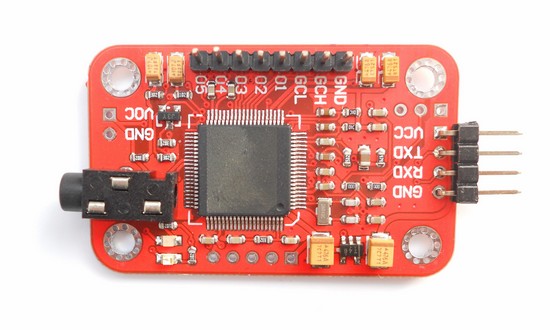
Parameters
- Voltage: 4.5-5.5V
- Current: <40mA
- Digital Interface: 5V TTL level UART interface
- Analog Interface: 3.5mm mono-channel microphone connector + microphone pin interface
- Size: 30mm x 47.5mm
This module can store 15 pieces of voice instruction. Those 15 pieces are divided into 3 groups, with 5 in one group. First we should record the voice instructions group by group. After that, we should import one group by serial command before it could recognize the 5 voice instructions within that group. If we need to implement instructions in other groups, we should import the group first. This module is speaker independent. If your friend speaks the voice instruction instead of you, it may not identify the instruction.
Example 1
Here i will show you an example how to control RGB by voice.
1. Recording
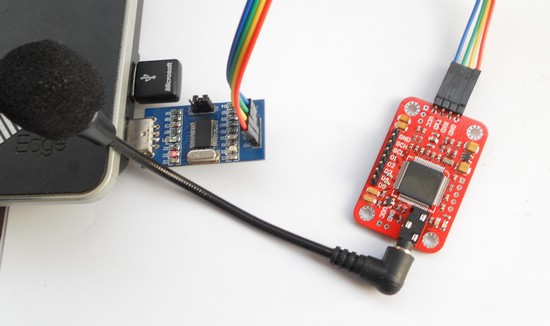
We need to send serial command to this module. You may need a USB-TTL module (Product Page) to connect it with PC. Send command 0xaa11 to record. Please refer to the manual for more information.
Please record the following voice instrctions in order:
- WHITE
- RED
- GREEN
- BLUE
- OFF
2. Hardware connection
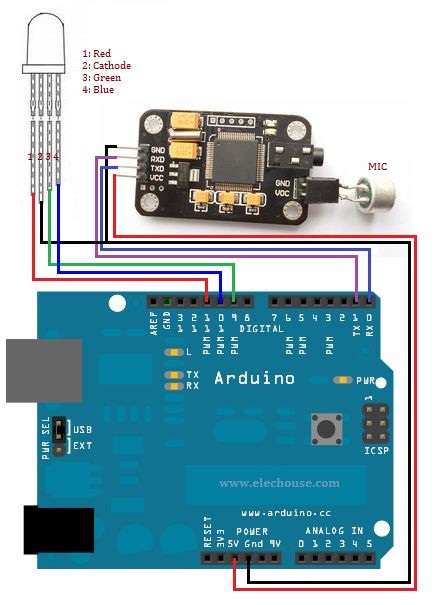
The module in above picture is V1. For V2, the connection is the same.
3. Code
int redPin = 11; // R petal on RGB LED module connected to digital pin 11
int greenPin = 9; // G petal on RGB LED module connected to digital pin 9
int bluePin = 10; // B petal on RGB LED module connected to digital pin 10
byte com = 0; //reply from voice recognition
void setup()
{
Serial.begin(9600);
pinMode(redPin, OUTPUT); // sets the redPin to be an output
pinMode(greenPin, OUTPUT); // sets the greenPin to be an output
pinMode(bluePin, OUTPUT); // sets the bluePin to be an output
delay(2000);
Serial.write(0xAA);
Serial.write(0x37);
delay(1000);
Serial.write(0xAA);
Serial.write(0x21);
}
void loop() // run over and over again
{
while(Serial.available())
{
com = Serial.read();
switch(com)
{
case 0x11:
color(255,255,255); // turn RGB LED on — white
break;
case 0x12:
color(255, 0, 0); // turn the RGB LED red
break;
case 0x13:
color(0,255, 0); // turn the RGB LED green
break;
case 0x14:
color(0, 0, 255); // turn the RGB LED blue
break;
case 0x15:
color(0,0,0); // turn the RGB LED off
break;
}
}
}
void color (unsigned char red, unsigned char green, unsigned char blue) // the color generating function
{
analogWrite(redPin, red*102/255);
analogWrite(bluePin, blue*173/255);
analogWrite(greenPin, green*173/255);
}
Upload the code above to Arduino. Please disconnect TX and RX while uploading code because uploading would occupy serial interface.
4. Video
After uploading is done, connect RX and TX, and then press RESET button on Arduino.
You can see the video on Youtube
Example 2
Here we will show you how to use the GPIO output to control other device.
Step 1
First you have to record the voice instruction. Send command 0xAA12 (group 2).
Please record the following 5 voice instructions in given order:
“One”
“Two”
“Three”
“Four”
“Five”
Please note you have to speak clearly.
Step 2
Connect the device with LEDs in the following way:
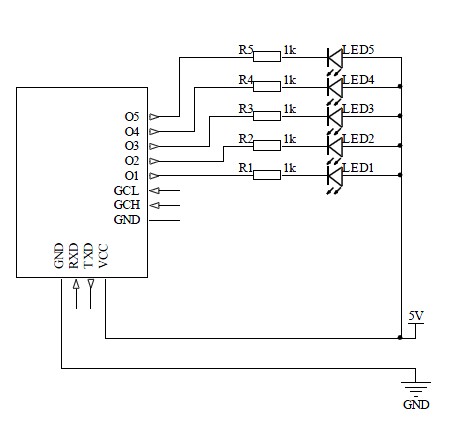
Step 3
Import voice group 2 by command 0xAA22 or set pin GCH HIGH and pin GCL LOW
Speak voice instruction.
Now you could control the LEDs by voice.
Document
Product list

- Voice recognition Module x1
- MIC x1
- 4pin wire x1